
SSIS to Apache Hop Migration: Automating the Move with SSIS2HOP
Your SQL Server Integration Services packages still run. That is not the same as a future. Microsoft’s data investment has moved to Fabric, Synapse and Dataflow Gen2; SSIS sits in maintenance. Meanwhile the connectors you depend on are being retired one by one — the Microsoft Connector for Oracle reached end of support on 4 July 2025 and is absent from SQL Server 2025. At some point the question stops being whether you migrate and becomes how much it will cost.
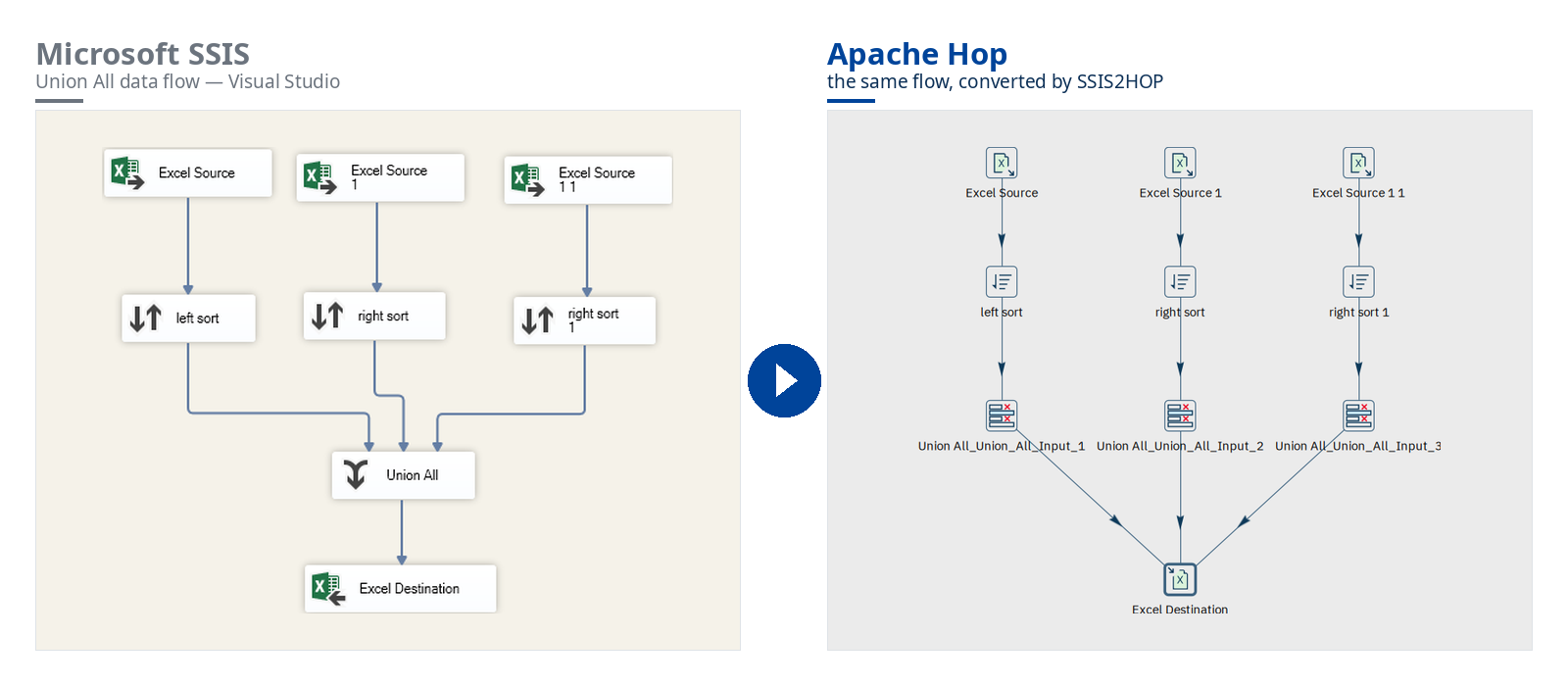
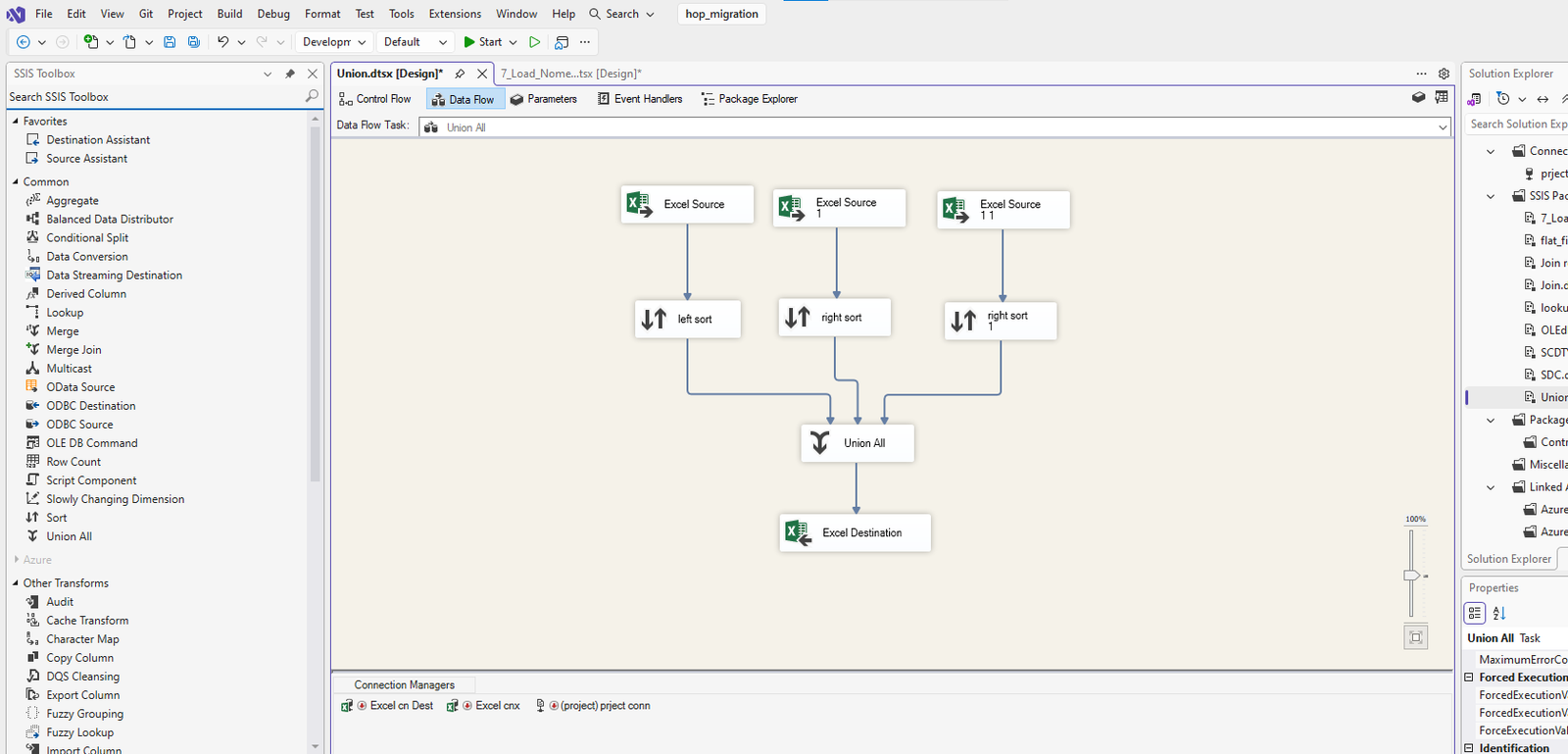
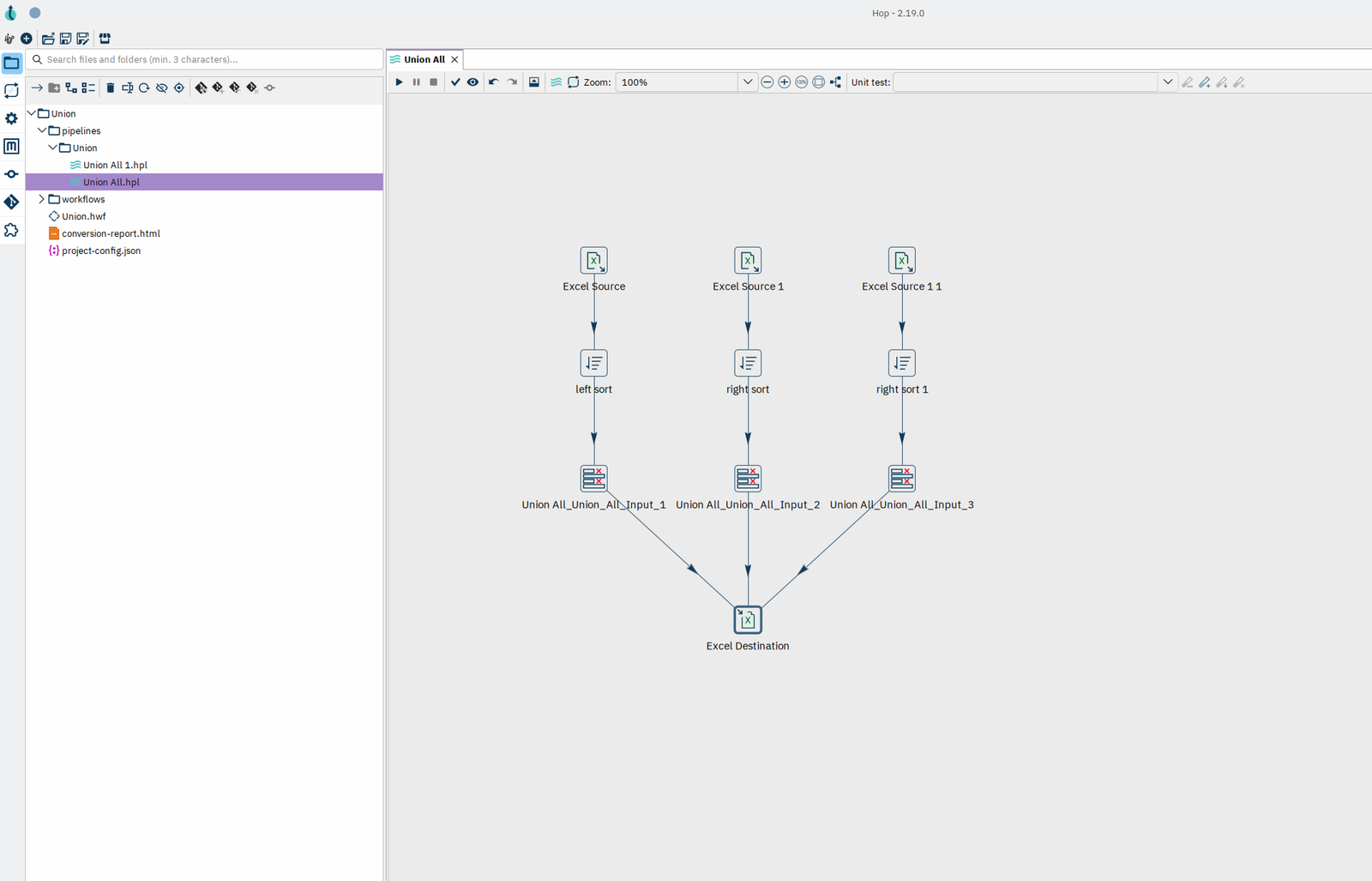
SSIS2HOP is a converter that answers the second question. It reads your .dtsx packages and .conmgr connection managers and writes a native Apache Hop project: pipelines, workflows and connection metadata that open in Hop GUI as if they had been designed there.
Why teams are leaving SSIS
The technical case for an SSIS migration rarely comes down to a single blocker. It is an accumulation:
- The platform is in maintenance, not development. No major functional investment is coming. The roadmap went elsewhere.
- Components are disappearing. The Oracle connector is gone. 32-bit execution has been removed. Each SQL Server release narrows the surface a little more.
- Windows and SQL Server lock-in. A dedicated server, SQL Server licensing, patching, version upgrades — and Visual Studio / SSDT for the smallest change.
- Software engineering is effectively impossible. A package is one opaque XML file. Moving a task rewrites hundreds of lines. Merges are risky, and two developers cannot realistically work on the same package at once.
- Batch-only, single-server architecture. Poorly suited to streaming, semi-structured data and current volumes — and a direct brake on any cloud or data-platform trajectory.
- The skills are drying up. New data engineers learn Python, dbt and Spark. Not a graphical tool designed in 2005.
Why Apache Hop is the natural landing zone
Apache Hop has been a Top-Level Project of the Apache Software Foundation since 2022, under the Apache 2.0 licence: no licence to buy, no vendor to depend on. For a team coming from SSIS, the mental model transfers almost directly — sources, transforms, destinations, hops between them — which is precisely why it is the lowest-friction target for an SSIS to Apache Hop migration.
| Criterion | Microsoft SSIS | Apache Hop |
|---|---|---|
| Licensing | Tied to SQL Server licensing | Apache 2.0 — no licence cost |
| Governance | Single vendor, closed roadmap | Apache Foundation, open community |
| Platform | Windows / SQL Server | Windows, Linux, Docker, Kubernetes, cloud |
| Execution engines | SSIS engine only | Native Hop, Spark, Flink, Dataflow, EMR (via Apache Beam) |
| Git, diff and merge | Monolithic XML, risky merges | Readable files, real diffs and merges |
| CI/CD and environments | Must be built from scratch | Native projects and environments, full CLI |
| Data testing | No native mechanism | Built-in unit and integration tests |
| Real time | Batch | Batch and streaming (Kafka, Beam, Flink) |
| Extensibility | Fixed catalogue, deprecated components | 400+ plugins, open architecture |
Two properties matter more than the rest. Hop is 100% metadata-driven: every object describes what it does, never how to execute it. And it is design once, run anywhere: the same pipeline runs on the native engine, or on Spark, Flink, Google Dataflow or AWS EMR through Apache Beam, without a rewrite.
What it costs to do it by hand
Take deliberately conservative assumptions: one hour to convert one flow, $300 per expert hour. A real SSIS package takes considerably longer than an hour.
| Volume | Manual conversion | Elapsed time | With SSIS2HOP | Saved |
|---|---|---|---|---|
| 100 flows | 100 h · $30,000 | ~3 weeks | 15 h · $4,500 | $25,500 |
| 300 flows | 300 h · $90,000 | ~2 months | 45 h · $13,500 | $76,500 |
| 1,000 flows | 1,000 h · $300,000 | ~7 months | 150 h · $45,000 | $255,000 |
Roughly 85% less human effort on the conversion itself — and that arithmetic only counts the writing. It ignores testing, defect fixing, regressions and bringing the team up to speed, all of which routinely double the announced workload on a real project. The residual 15% with SSIS2HOP covers reviewing the converted flows and handling genuinely bespoke cases.
“We’ll just ask an AI to convert them”
It is the first idea everyone has, and on its own it does not survive contact with a 300-package estate. A large language model alone produces a draft — a different draft on every run, and one you cannot audit.
- Non-determinism. Convert the same package twice, get two different results. Nothing to replay, nothing to put under quality control.
- Hallucinations. Transforms that do not exist, invented parameters, properties that look plausible and are wrong. They survive review and break at runtime.
- Compounding error. Four steps that are each 95% reliable give you 81% overall. Across 300 flows that is dozens of pipelines to redo.
- The prompt-test-fix loop. Flow by flow, you end up asking the model that hallucinated to find its own mistake.
The right architecture is hybrid, not “all AI”. A deterministic engine builds the pipeline structure — parser, rules, property mapping: same input, same output, every time. AI is used only where it is genuinely useful and verifiable: translating SSIS expressions and C# / VB.NET scripts, under the engine’s control. That is exactly how SSIS2HOP is built.
What SSIS2HOP actually does
Point it at a single package or a whole SSIS project folder:
./ssis2hop.sh \
  --input  /path/to/ssis/project \
  --output /path/to/hop/project \
  --hop-home /opt/hop
What comes out is a complete Hop project: .hpl pipelines for the data flows, .hwf workflows for the control flow and its containers, .json connection metadata, and the project configuration. Layout coordinates are preserved, so a converted pipeline is visually recognisable to the person who wrote the original package.
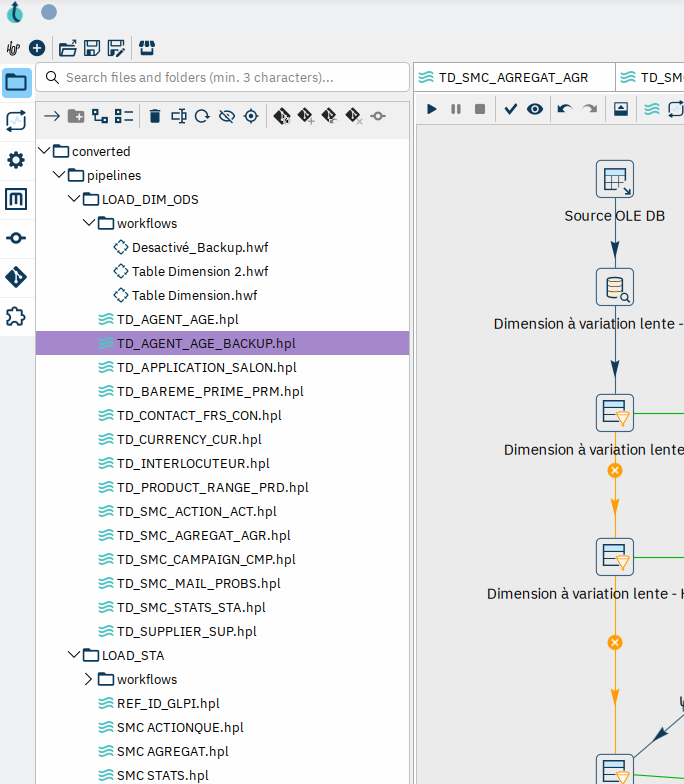
Under the hood it is a four-layer architecture: a normalizer that resolves the case collisions and lineage quirks real-world .dtsx files are full of; an SSIS parser; one handler per component type; and a writer built on the official Apache Hop SDK. That last point matters more than it sounds — the XML is produced by Hop’s own serialization code, never by string concatenation, which eliminates an entire class of “the file opens but the transform is empty” bugs.
Coverage: more than 40 SSIS components
OLE DB Source and Destination, Flat File Source and Destination, Excel, Sort, Aggregate, Data Conversion, Lookup, Merge Join, Union All, Conditional Split, Multicast, OLE DB Command, Slowly Changing Dimension, Derived Column, Script Component, Row Count — plus the control flow side: Execute SQL Task, Data Flow Task, Execute Package Task, Script Task, Send Mail Task, and Sequence, ForEach and For Loop containers. On the connection side: OLE DB, MySQL, Oracle, PostgreSQL, Sybase, SMTP and flat-file connection managers.
Some of these are not one-to-one mappings. A Conditional Split becomes a fan-out of FilterRows transforms. An SSIS Slowly Changing Dimension box is expanded into a full lookup-and-filter subgraph with its six output ports rebound. That topology work is the part that makes hand conversion slow, and the part a generic AI prompt gets wrong.
Know before you commit: the analysis report
Running with --analyse converts nothing. It inventories the estate and produces a coverage matrix: which components are fully automatic, which are partial, which need AI, which need a human. You get the expected automatic conversion rate before anyone signs off on a budget.
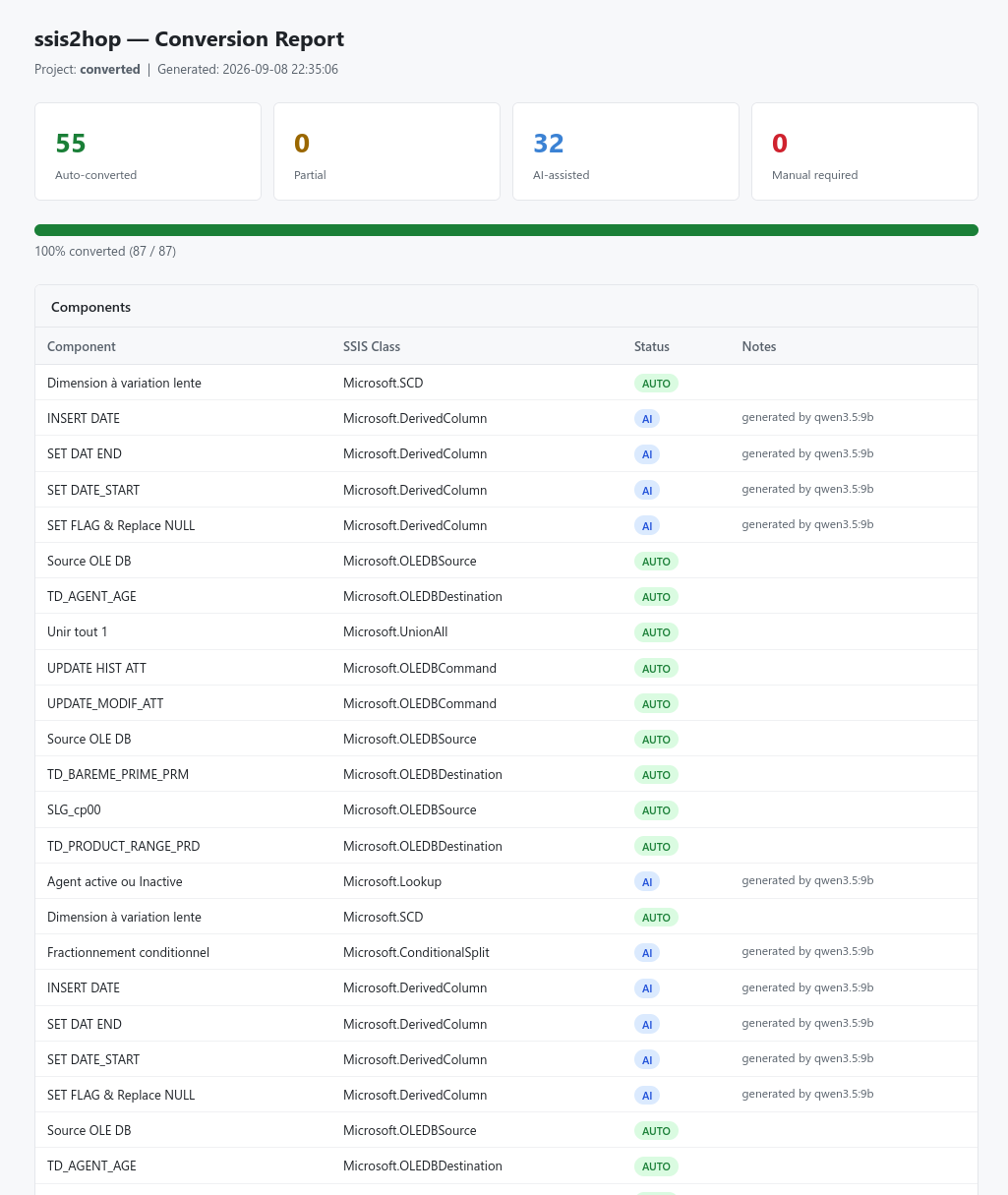
Conversion report
Every run produces an HTML report listing each component with its status — AUTO, PARTIAL, AI or MANUAL — and the reason. It is the review worklist for the 15% that still needs a human.
Proving the data matches
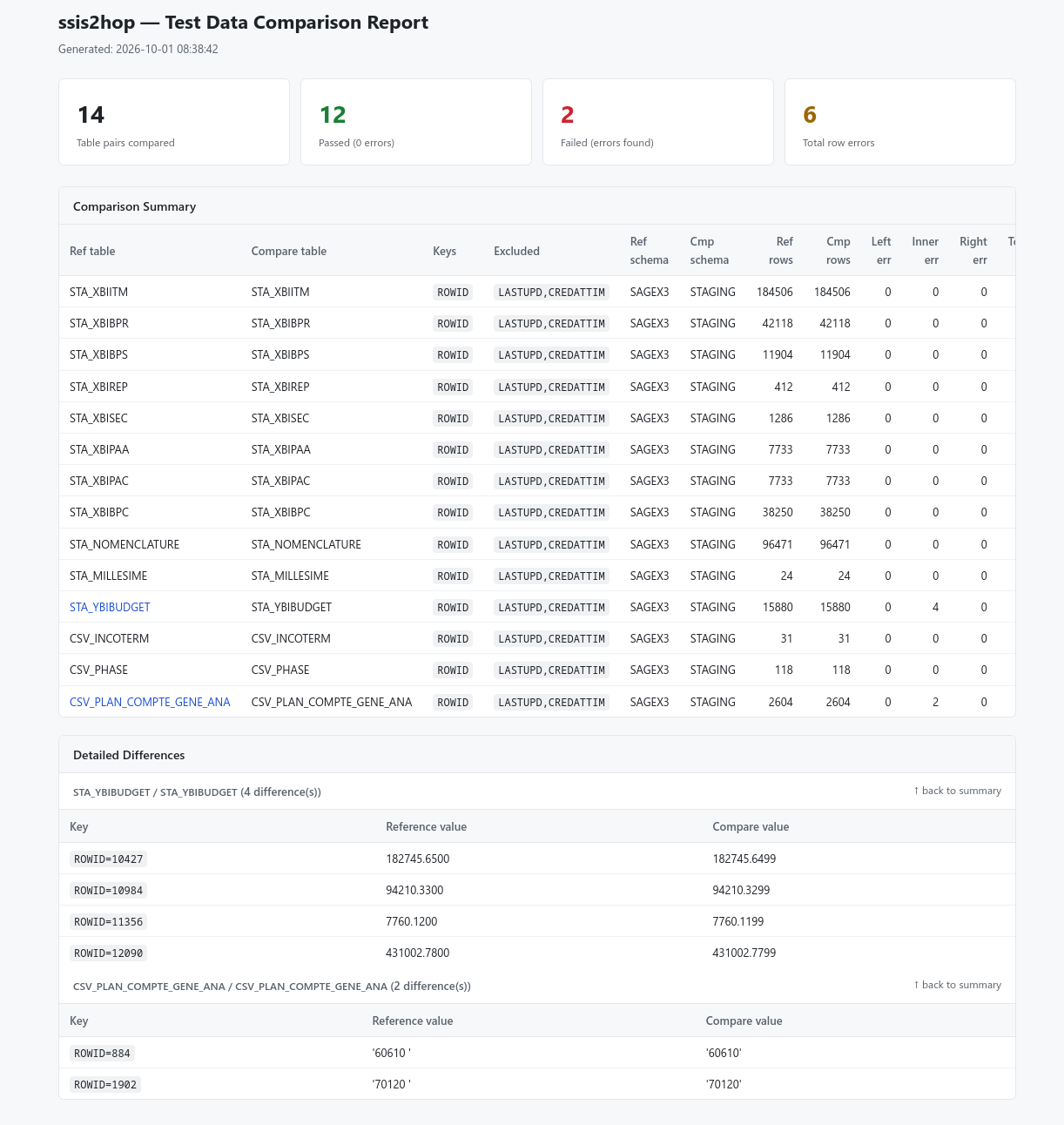
Structural conversion is not the deliverable. Identical data is. The --testdata mode generates a comparison pipeline per table, runs them through hop-run, and produces an HTML diff report between the tables your SSIS packages produced and the tables the Hop pipelines produce. That report is what turns “it converted” into “it is validated”.
Rules you can change without recompiling
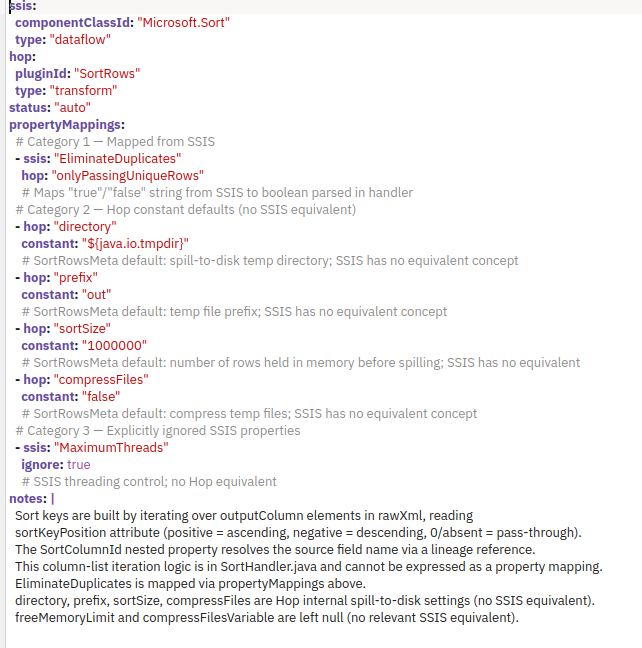
Every component mapping lives in a YAML rule file — source property, target property, defaults, ignored fields. Adapting the converter to your naming conventions or architectural standards is a YAML edit, resolved from ./rules/, ~/.ssis2hop/rules/ or the JAR, in that order. No recompilation, no fork.
How a migration actually runs
A tool is not a project. Here is the four-phase approach we run at WM Communication & Conseil:
- Audit and scoping. Package inventory, complexity measurement, expected automatic conversion rate, costed migration plan.
- Pilot. 10 to 20 representative flows converted, executed and validated against your own data. Proof before commitment.
- Mass conversion and testing. Industrialised conversion, SSIS-versus-Hop result comparison, rework of the bespoke cases.
- Training and support. Getting your teams productive on Hop, then maintenance under SLA from Paris and Tunis.
Frequently asked questions
Can SSIS packages be converted to Apache Hop automatically?
Largely, yes. SSIS2HOP converts more than 40 SSIS components deterministically, including topology-changing ones such as Conditional Split and Slowly Changing Dimension. Expressions and .NET scripts are translated with AI assistance under the engine’s control, and a small residue — typically around 15% of the effort — is reviewed by hand.
Does the converted project depend on SSIS2HOP at runtime?
No. The output is a standard Apache Hop project. Once converted, you run it with Hop, in Hop GUI, hop-run, a container or Kubernetes. The converter is not in the runtime path.
How long does an SSIS to Apache Hop migration take?
The conversion itself is minutes. The project length is driven by testing and validation, not by writing pipelines. On a 300-flow estate, the converted flows are available in days rather than the two months a manual rewrite takes.
What versions are supported?
SSIS2HOP always targets the latest Apache Hop version and its requirement. It reads .dtsx, .conmgr and .dtproj files from standard SSIS projects.
Talk to us
If you are running an SSIS estate and wondering what it would take to move it, the audit phase is the cheapest way to find out — it gives you a package inventory, an automatic conversion rate and a costed plan before you commit to anything.
Mhamed Ben Jmaa — WM Communication & Conseil
contact@wmcom-conseil.com